AI assistants are getting good enough to answer real business questions, but only if they can actually see your data. That’s the gap MCP was built to close, and it’s why we’re bringing it to our platform.
Instead of you logging in every day to piece together how your campaigns are doing, you’ll soon be able to just ask.
In this article, we’ll break down what MCP actually is, what our upcoming MCP server will let you do as an affiliate running ads on our traffic, and how to get ready before it launches.
TL;DR
- MCP (Model Context Protocol) lets AI assistants like Claude connect directly to live tools and data, no custom integrations needed.
- It gives AI access to “tools” (actions), “resources” (data), and “prompts” (task templates), without ever exposing raw credentials.
- For affiliates, this means asking plain-language questions (e.g., “which offers converted best this week?”) instead of manually digging through dashboards.
- Use cases: performance reporting, optimization tips, creative generation, and cross-network reconciliation.
What Is MCP (Model Context Protocol)?
Model Context Protocol is an open standard, originally released by Anthropic in November 2024, that defines how AI models talk to external tools and data sources.
Before MCP, connecting an AI assistant to any platform (a CRM, an ad account, an affiliate dashboard) required a custom-built integration for that specific combination of AI tool and platform. Multiply that across every AI tool and every platform, and you get a mess of one-off connectors that are expensive to build and even more expensive to maintain.
MCP fixes that with a single, standardized protocol. Any MCP-compatible AI assistant can connect to any MCP server and immediately understand what it’s allowed to do, no custom code needed on your end.
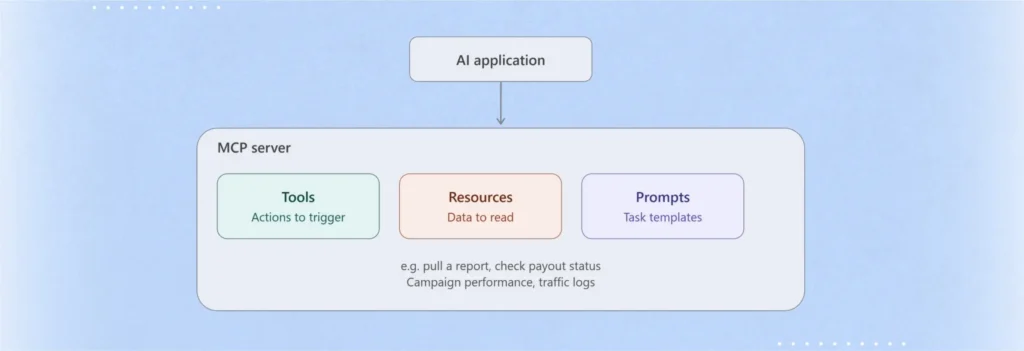
An MCP server exposes three things to the AI:
- Tools: actions the AI can trigger, like “pull this week’s conversion report” or “check payout status”
- Resources: data the AI can read, like your campaign performance or traffic logs
- Prompts: ready-made templates that guide the AI through a specific task, like a weekly performance summary
How Does an MCP Server for Affiliate Marketing Works?
- You (or your platform) run an MCP server that wraps access to a specific system, say, the reporting API of your affiliate network or ad network.
- An AI client (like Claude) connects to that server.
- The client asks the server what tools and data are available.
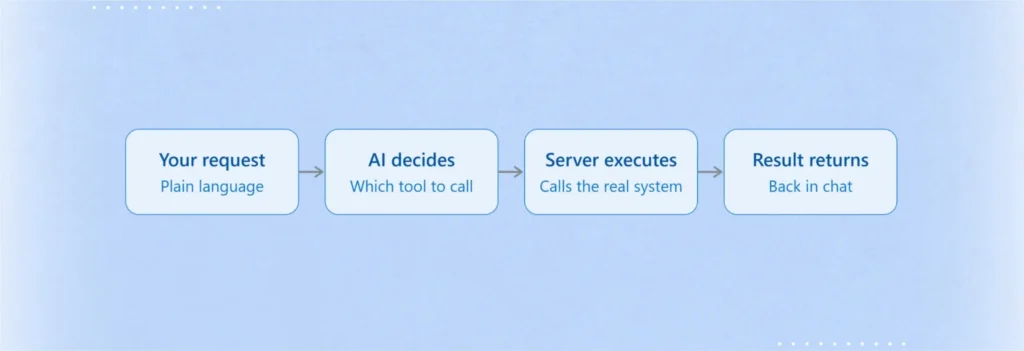
- When you make a request in plain language “show me which offers had the highest EPC this week”) the AI model decides which tool to call, the MCP server executes it against the real system, and the result comes back into the conversation.
The security benefit is central to why MCP has caught on: the AI model never gets your raw credentials. The MCP server handles authentication and permissions, and only exposes the specific actions and data you choose to allow.
Why Does An MCP Server Matter for Affiliate Marketers?
Affiliate marketing runs on data scattered across many systems: your ad network’s dashboard, tracking platforms, spreadsheets, Slack alerts, payment records, and creative libraries.
Normally, pulling insights across all of that means manual exports, custom scripts, or waiting on a developer. An MCP changes the process by letting an AI assistant query connected systems and reason in one conversation.
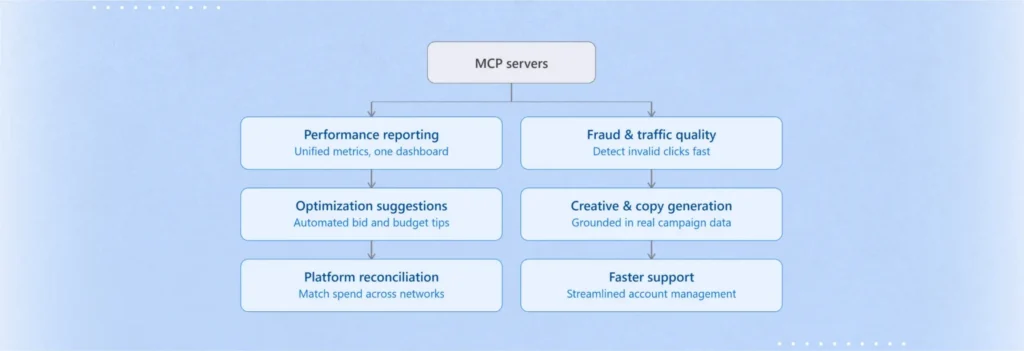
MCP Use Cases for Affiliates and Media Buyers
– Unified performance reporting.
Connect your tracking platform (e.g., Everflow, Voluum, or an in-house system) via MCP, and ask an AI assistant to summarize clicks, conversions, EPC, and ROI across offers without manual exports.
– Automated optimization suggestions.
With access to spend and conversion data through MCP, an assistant can recommend which offers, geos, or creatives to scale or pause.
– Creative and copy generation grounded in real data.
Instead of guessing what messaging converts, the AI can pull actual top-performing ad copy or landing page data through an MCP resource and generate new variations based on it.
– Cross-platform reconciliation.
Affiliates running the same offer across multiple networks can use MCP to pull data from each network’s API and reconcile numbers in one place.
– Faster support and account management.
Ad networks can expose an MCP server to internal teams so account managers can ask an AI assistant questions like “which publishers underperformed this month” instead of digging through dashboards.
MCP vs. Traditional API Integrations: What’s Actually Different?
MCP doesn’t replace APIs, it standardizes how AI assistants use them. A traditional integration connects one specific app to one specific data source with custom code; MCP lets any MCP-compatible AI assistant connect to any MCP server using the same protocol, with no custom integration work required.
| Aspect | Traditional API Integration | MCP Server |
|---|---|---|
| Setup | Custom code per AI tool + per platform combination | One server, works with any MCP-compatible AI client |
| Maintenance | Breaks when either the API or AI tool updates; requires ongoing development work | Maintained centrally by the platform (e.g., Mondiad) |
| Usage | Requires a developer to build and maintain | Affiliates and marketers can query in plain language with no coding required |
| Credentials | Often requires sharing raw API keys with the AI tool or middleware | AI never sees raw credentials, the MCP server handles authentication |
| Scalability | One-off integrations that don’t automatically extend to new AI tools | New AI clients can connect without additional integration work |
| Best for | Deep, highly customized, one-off automations | Ad-hoc querying, reporting, and reasoning across data using natural language |
Who Should Be Using MCP Servers?
In affiliate marketing, MCP servers are mainly useful for these groups:
- Affiliate networks and ad networks (like Mondiad): to let AI tools query performance data, or automate account manager workflows across many advertisers and publishers at once.
- Affiliate managers and media buyers: anyone juggling multiple offers, geos, and traffic sources who wants an AI assistant to pull reporting, compare EPCs, or spot underperforming campaigns without manually exporting spreadsheets from five different dashboards.
- In-house marketing/ops teams at advertisers: brands running their own affiliate programs who want AI-assisted monitoring of partner performance, payouts, and compliance.
- Developers building affiliate tooling: engineers who want to expose a tracking platform, attribution system, or internal database to AI clients in a standardized, secure way, rather than writing one-off integrations per AI tool.
MCP Servers FAQ
Is MCP the same as an API?
Not quite. An API is a specific interface one platform exposes; MCP is a standardized protocol that lets any AI assistant talk to any MCP server the same way, including ours, without a custom integration built for each combination.
Will I need to be technical to use this?
No. Once our MCP server is live, connecting your AI assistant to your account will be a simple setup step, no coding required for everyday use.
Which AI assistants will work with it?
Claude and other MCP-compatible AI assistants will be able to connect once the server is available.
Will this give an AI full control over my account?
No. You decide what your AI assistant can read or do, starting with reporting and monitoring is the recommended first step, and any action beyond that stays within limits you set.
What’s the difference between a “tool” and a “resource” in MCP?
Tools are actions the AI can trigger on your behalf (like pulling a report); resources are data it can read (like your conversion history).
In Greater News: Run the Mondiad MCP Connector
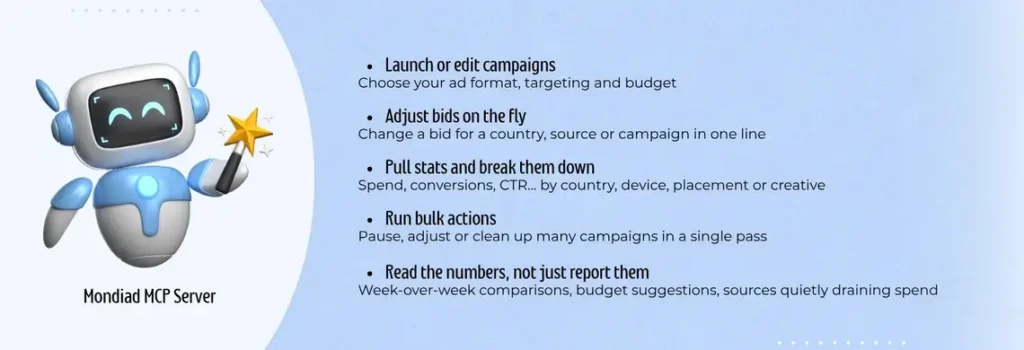
Affiliate marketing generates a constant stream of signals clicks, conversions, payouts, caps, and checking all of it manually doesn’t scale, especially if you’re running multiple campaigns across our ad network.
That is why our goal with this Mondiad MCP Connector is simple:
Let you ask questions in plain language and get real answers from your own account with us, instead of hunting through reports. Where routine, well-defined actions like reporting are the easy first step, we’re also exploring guarded, opt-in automation for things like budget alerts down the line.