


Running a whitelist campaign on push traffic without a tracker means optimizing blind. This guide shows you how to use CPV Lab with Mondiad to build a whitelist campaign from push traffic and pop traffic – tracking zones, split testing landing pages, and scaling only what converts.
TL;DR
- Running push and pop campaigns on Mondiad without a tracker means you’re optimizing based on total campaign numbers.
- Adding CPV Lab to the stack lets you see what happens after the click — which landing page the visitor saw, how they engaged with it, and which combination of zone, page and offer is actually making you money.
- This guide walks you through the full process: from campaign setup to profitable whitelist.
Read more about CPV Lab at cpvlab.pro or try the cloud version at cpvone.com.
SECTION 1 – WHY THIS MATTERS
The Difference Between a Zone List and a Whitelist
Push and pop traffic on Mondiad runs across thousands of different placements – different websites, different audiences, different contexts. Some of those placements will convert for your offer. Most won’t.
The goal of a whitelist campaign is simple: stop spending money on placements that don’t convert, and concentrate your budget on the ones that do. Run leaner, pay less per conversion, scale with confidence.
If buying traffic this way is new to you, start with the basics of affiliate marketing programmatic advertising.
The challenge is knowing which placements are which. And that’s where most affiliates get stuck.
Without a tracker, you’re looking at total campaign stats – clicks, conversions, total cost. Everything averaged together. A campaign that looks like it has a 2% conversion rate might actually have three zones converting at 8% and 200 zones converting at 0%. You can’t know. So you can’t act.
A tracker breaks those numbers apart. It shows you performance per zone, per landing page, per offer – so you can see exactly where your money is going and what it’s producing.
| Example: An affiliate runs a sweepstakes offer on Mondiad push for 5 days. Total stats look mediocre — 1.8% CVR, slightly below breakeven. They almost pause the campaign. With CPV Lab active, they check the zone breakdown: 12 zones have converted, 180+ have not. Of those 12, four zones have a CVR above 4% on the winning landing page. They pause the losing zones, build a whitelist campaign targeting those four zones on the right LP, increase the bid — and the campaign turns profitable within 48 hours. The traffic didn’t change. The visibility did. |
That’s the whitelist advantage. And it starts with tracking.
SECTION 2 – THE FULL PICTURE CPV LAB GIVES YOU
What CPV Lab Tracks – And Why Each Part Matters
When a visitor clicks your Mondiad ad and arrives at your landing page, most of the story is just beginning. CPV Lab records every step of it.
Zone-level performance
CPV Lab captures which Mondiad zone sent each visitor and connects it to everything that happens after: landing page behavior, conversion or no conversion, revenue generated.
You can sort your entire campaign by zone and see exactly which placements are making you money and which are costing you money. That zone breakdown is the foundation of every whitelist decision you make.
Landing page behavior
Did the visitor actually engage with your landing page? Did they scroll, click the CTA, or spend time reading? Or did they bounce in two seconds? CPV Lab tracks on-page behavior – clicks, engagement events, time on page, so you can tell the difference between a zone that sends interested visitors and one that sends low-quality traffic that never converts regardless of what you show them.
This matters more than most affiliates realize. Two zones with identical CVRs can behave completely differently on the page.
One sends engaged visitors who read and decide. The other sends visitors who click the ad by accident and leave immediately. Your whitelist should be built on the first kind – not just conversion count.
Landing page split testing
Running one landing page and hoping it works is leaving money on the table.
CPV Lab lets you run multiple LP variants simultaneously (with MV Lab) and distributes your Mondiad traffic between them. The data shows you not just which LP wins overall – but which LP wins on specific zones.
This combination is what makes a whitelist genuinely reliable.
A zone that converts at 4.8% on LP-A and 0.3% on LP-B isn’t just a good zone – it’s a good zone for that specific page.
When you scale it, you know exactly what setup to replicate.
Conversion tracking from your affiliate network
CPV Lab receives conversion data from your affiliate network via server-to-server postback. Every sale, lead, or signup fires back to CPV Lab and gets attributed to the exact zone and landing page that produced it.
No guessing, no pixel misfires, no cross-device gaps – just accurate conversion data connected to the full visitor record.
Cost and ROAS per zone
CPV Lab syncs your ad spend from Mondiad and calculates cost and ROAS at the zone level. You don’t just see which zones convert – you see which zones are profitable after spend. That’s the number that actually matters when you’re deciding what to whitelist.
SECTION 3 – GETTING SET UP
Setting Up CPV Lab with Mondiad
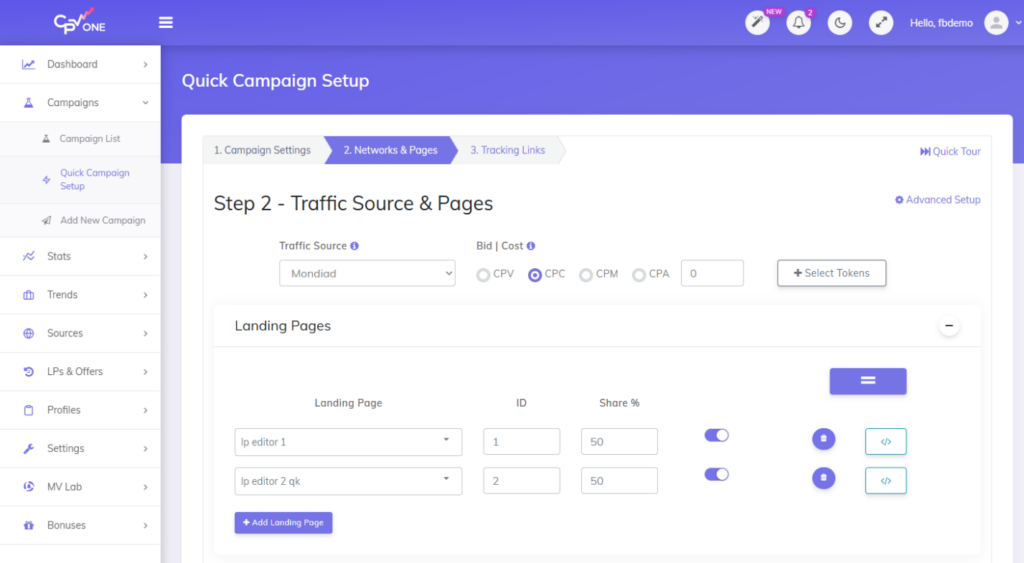
CPV Lab comes with Mondiad pre-configured in its Traffic Sources Catalog, you don’t need to set up the integration from scratch. Import it, connect your account, and you’re ready to launch your first tracked campaign.
Not on CPV Lab yet? See how the best ad trackers compare before you pick one.
| The full step-by-step setup guide with screenshots and a video walkthrough is available here. Covers: importing Mondiad from the catalog, creating your first campaign, setting your tracking URL in Mondiad, and activating the postback. |
Full step-by-step guide with video
The postback – the most important step
The postback URL is how CPV Lab sends conversion data back to Mondiad every time a sale or lead happens. This is not optional – it’s one of the most valuable things you can do for your campaign performance.
Here’s why it matters so much: Mondiad’s algorithm uses conversion signals to understand which traffic is performing well. Every conversion you send back via postback teaches the algorithm something about your buyers — which zones they come from, what device they use, when they convert. Over time, that data helps Mondiad optimize delivery toward better-performing traffic automatically.
Affiliates who skip the postback setup are running blind in both directions – they can’t see performance in their tracker, and Mondiad can’t optimize toward their buyers.
The postback closes that loop.
https://postback.pbmnd.com/track?uid=YOUR_MONDIAD_ID&clickid={!tscode!}&payout={!revenue!}Add this postback URL in your CPV Lab traffic source settings with your Mondiad account ID. CPV Lab fills in the click ID and payout automatically on each conversion. That’s it – every sale now feeds Mondiad’s algorithm in real time.
SECTION 4 – THE LP LAYER
Why Landing Page Split Testing Changes Your Whitelist
Here’s the scenario some affiliates run into without LP split testing:
| You’re running an offer on Mondiad push. Zone 4821 has sent 300 clicks and 6 conversions – a 2% CVR. Looks okay. You add it to your whitelist and bid up. Three days later the zone is barely breaking even. What happened? What you couldn’t see: Zone 4821 was running against two landing pages. LP-A was converting at 4.8%. LP-B was converting at 0.3%. The zone wasn’t average — it was brilliant on one LP and terrible on the other. When you scaled, you sent more traffic to both LPs equally. LP-B dragged everything down. With LP split test data in CPV Lab, you would have seen this before scaling. You’d have paused LP-B, whitelisted the zone on LP-A specifically, and scaled that combination. Same zone. Very different outcome. |
LP split testing and whitelist building are not separate tactics -they work together when you test multiple landers. The zone tells you where the traffic comes from. The LP test tells you what that traffic responds to. You need both to make a whitelist decision you can trust.
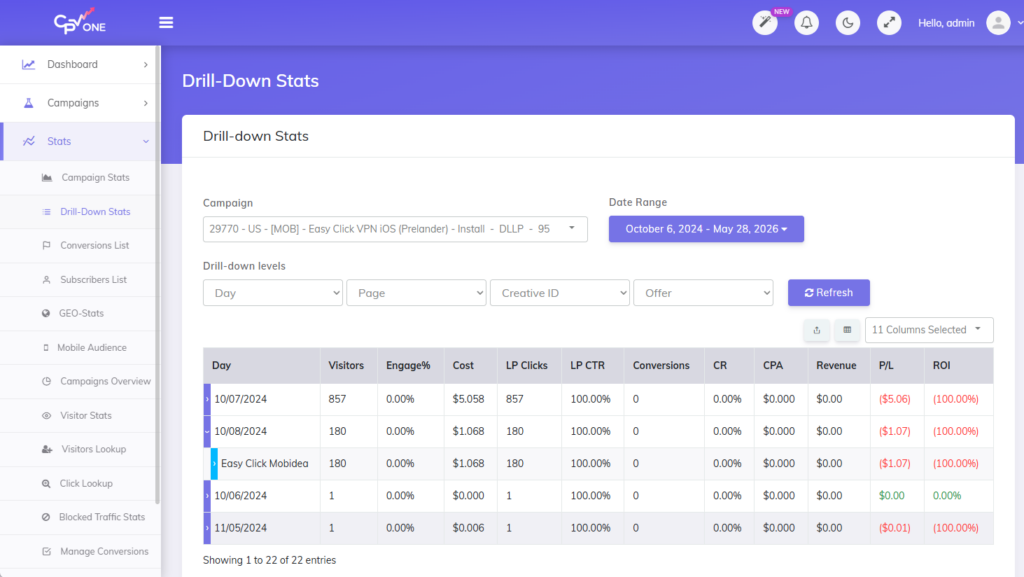
Learn more about split testing in CPV Lab and multivariate testing with MV Lab.
- Zone 4821 + LP-A: 180 clicks, 4.8% CVR, profitable → whitelist this combination
- Zone 4821 + LP-B: 120 clicks, 0.3% CVR → pause LP-B, not the zone
- Zone 9033 + both LPs: 200 clicks total, zero conversions → blacklist the zone
- Zone 7711 + LP-A: 90 clicks, 6.1% CVR → promising, needs more data
SECTION 5 – THE FULL WORKFLOW
The Whitelist Building Workflow – Stage by Stage
Here’s the complete process from campaign launch to scaled whitelist:
| Stage | What Happens | Key Insight |
| Days 1–3: Collect | Broad campaign live. 2–3 LP variants running in split test. Conversion postback active – every sale registered in CPV Lab fires back to Mondiad simultaneously | Do not cut anything yet. You need meaningful data per zone and per LP before any decision is valid. |
| Days 3–5: Read LP data | Check split test results per LP. Is one LP already outperforming? Does one LP do better on certain zones than others? Maybe use Multivariate Testing to test the elements on the page? | Mondiad can tell you a zone is converting. CPV Lab tells you a zone converts at 6% on LP-A and 1% on LP-B. That is an important information. |
| Days 5–7: First cuts | Pause zones with high spend and zero conversions. Pause the underperforming LP variants. | Run on the winning LP only. Now your zone data is clean – one page, real signal, no noise from a bad LP averaging down the numbers. |
| Week 2: Build whitelist | Filter CPV Lab report: profitable zones, above your EPC threshold. Export zone IDs. Paste into a new Mondiad whitelist campaign. Increase bid. | The postback data you have been sending to Mondiad is already helping their algorithm find better traffic on those zones. The whitelist and their optimization work together. |
| Ongoing: Refine | Keep a broad campaign running for zone discovery. Check CPV Copilot every few days for emerging patterns. | A whitelist is never finished. Add zones as they prove themselves. Remove ones that decay. Mondiad’s network evolves – so should your list. |
When you raise bids on a whitelist campaign, watch your advertising win rate to confirm the higher bid is actually winning more auctions on those zones.
| The rule that changes everything: Don’t whitelist a zone if you test multiple pages. Wait until you know which LP it converts on. A zone added to a whitelist without LP context is a half-decision. You might scale the right zone with the wrong page and wonder why it stopped working. Take the extra 2–3 days to let LP data accumulate alongside zone data. The whitelist you build will be more stable and significantly more profitable. |
SECTION 6 – READING THE DATA INTELLIGENTLY
How to Read Your Campaign Data Beyond Conversions
Zone ID and conversion count are your starting point. A great starting point if you have them together. With a tracker, like CPV Lab, you can captures a richer picture – and learning to read it turns a decent whitelist into a great one.
Device and OS – your LP might be the problem, not the zone
A zone that looks average in total can be a top performer on one device type and a budget drain on another. This is especially common when landing pages aren’t fully optimized for mobile – a zone sending 80% Android traffic will look terrible if your LP has a broken CTA on mobile Safari.
Before blacklisting a zone, check whether the poor performance is consistent across all devices or concentrated on one. Sometimes the fix is a better mobile LP, not a blacklist entry.
Engagement vs. conversion rate – spot traffic quality problems early
A zone with a high bounce rate and a low conversion rate is a different problem from a zone with good engagement but no conversions. The first likely has a traffic quality issue – visitors aren’t interested in your offer regardless of the page. The second might have a landing page mismatch – visitors are engaged but something about the page or offer isn’t closing them.
CPV Lab shows you both. Use engagement data to diagnose the problem before deciding whether to blacklist the zone or test a new LP.
Time patterns – when a zone converts matters
Push traffic behavior varies significantly by time of day and day of week. A zone that looks unprofitable overall might be highly profitable between 7pm and 11pm and terrible the rest of the time. CPV Lab’s Day column in drill-down reports shows you conversion patterns over time.
This is especially useful once you have a whitelist running. Scheduling your whitelist campaign to run during peak conversion hours on your best zones can meaningfully improve ROAS without spending more.
SECTION 7 – TAKING IT FURTHER
Automating Your Whitelist Workflow
Once your tracking setup is running well, CPV Lab’s API and Make.com integration let you automate the repetitive parts of campaign management – so you spend less time pulling reports and more time scaling winners.
CPV Copilot – AI analysis built in
CPV Copilot is CPV Lab’s built-in AI feature. Select a campaign and it analyzes your zone performance, LP split test results, and conversion data – then tells you what to focus on next in plain language. No filtering through tables, no manual calculations.
Find out more about CPV Copilot and all CPV Lab features.
CPV Copilot is available in all CPV Lab plans and works in any language.
Make.com automations – the practical ones worth setting up
CPV Lab is available as a custom app in Make.com, a no-code automation platform. You don’t need a developer to use it. Here are the automations that save the most time for push campaign management:
- Weekly whitelist export: every Monday, pull your top zones by earnings per click from CPV Lab via API and drop them into a Google Sheet – your updated whitelist, ready to paste into Mondiad.
- Cost threshold alert: when a zone exceeds 3x your target CPA with zero conversions, send a Slack or email notification automatically so you can pause it before more budget is wasted.
- LP winner notification: when a split test reaches a clear winner in CPV Lab, send an alert with the winning LP and the zone breakdown – so your team acts on the result the same day, not a week later.
- Daily performance summary: pull campaign stats from CPV Lab every morning and push a summary to Slack – top zones, ROAS, spend – so everyone stays aligned without logging in.
| No developer needed. Make.com is a visual, no-code tool. Connect CPV Lab, choose your trigger, set your destination. Full API documentation here. |
SECTION 8 – COMMON MISTAKES
Whitelist Mistakes That Cost Affiliates Money
Cutting zones too early. A zone with 40 clicks and zero conversions is undecided, not bad. Wait for enough data per zone per LP variant before making any whitelist or blacklist decision. Cutting too early removes zones that would have been profitable given more time.
Whitelisting without LP context. A zone that converts on one LP and fails on another is not unconditionally good – it’s conditionally good. Build your whitelist around the zone and LP combination, not the zone alone.
Skipping the postback. Running a campaign without sending conversion data back to Mondiad means their algorithm is optimizing without knowing what success looks like for your offer. You’re leaving Mondiad’s most valuable optimization tool switched off.
Building a whitelist and stopping discovery. Always keep a broad campaign running alongside your whitelist at a lower budget. New zones get added to Mondiad’s network regularly – the ones converting for you today aren’t the only ones that ever will.
Not reviewing the whitelist regularly. Push traffic sources evolve. Publisher audiences change. A zone that was in your whitelist three months ago may have decayed significantly. Review and refresh your whitelist every two to four weeks.
SETUP RECAP
Quick Setup: Mondiad + CPV Lab
- Import Mondiad from the CPV Lab Traffic Sources Catalog and configure your campaign. Full guide with video above.
- Set up the postback URL with your Mondiad account ID. Every conversion will fire back to Mondiad in real time – this is what powers their campaign optimization.
- Create a campaign in CPV Lab with 2–3 LP variants. Use AI Smart Rotation from CPV Lab to distribute traffic between them.
- After 3–5 days: open the CPV Lab zone report, filter by zone and LP combination, identify profitable pairs. That’s your whitelist.
- Build your Mondiad whitelist campaign targeting those zones. Increase your bid. Keep a broad campaign running in parallel for ongoing discovery.
FAQ
How many clicks do I need before I can build a whitelist?
At least 100 clicks per zone per landing page variant before making a whitelist or blacklist decision. For lower-payout offers (under $2 CPA), wait for 200+. For higher-payout offers ($10+), 50 clicks with 2–3 conversions can be a tentative whitelist signal – but verify before scaling.
Should I whitelist by zone alone or by zone and landing page?
Always by zone and LP combination if you’re running split tests. A zone that converts on LP-A and fails on LP-B is not a good zone unconditionally – it’s a good zone for that specific page. Whitelist the pair, not just the zone.
Why is the postback so important?
The postback sends your conversion data back to Mondiad in real time. Mondiad’s algorithm uses that data to understand what converting traffic looks like for your offer — and over time, to serve more of it. Campaigns with an active postback benefit from Mondiad’s optimization engine. Campaigns without it don’t.
Does CPV Lab work for both push and pop campaigns on Mondiad?
Yes. The same setup works for both ad formats. If you’re running both push and pop, you can track them separately in CPV Lab and compare performance between formats in the same dashboard.
What’s the difference between CPV Lab and CPV One?
CPV Lab is the self-hosted version – you install it on your own server and own all your data. CPV One is the cloud-hosted version – no server needed, you can start in minutes. Both have identical features: LP split testing, CPV Copilot, Make.com integration, Mondiad setup, and full postback support.
CONCLUSION
A Whitelist Built on Real Data. Not Just Zone IDs.
Push and pop traffic on Mondiad is high-volume and fast. That’s exactly what makes it powerful — and exactly what makes tracking essential. Without visibility into what happens after the click, you’re optimizing on averages instead of facts.
The affiliates who consistently profit from push traffic track everything: which zones send engaged visitors, which landing pages those visitors respond to, which combinations produce actual revenue. They send that conversion data back to Mondiad so the algorithm can help them find more of the same. And they use tools like CPV Copilot and Make.com automations to keep the analysis from eating their time.
That’s the full stack. Mondiad brings the traffic. CPV Lab brings the intelligence. Together, they give you a whitelist you can actually scale.
| CPV One – Cloud Start in minutes. No server needed. 14-day free trial · No credit card cpvone.com | CPV Lab – Self-hosted Own your data. Monthly, yearly or lifetime. 14-day free trial included cpvlab.pro |
