

Close Menu
  • Publishers
  • Advertisers
  • Help Center
  • Let’s meet!
  • Contact
  • English
    • English
    • Русский

Subscribe to Updates

Get the latest news from Mondiad.

What's Hot

What Breaks in an Affiliate Team When Growth Outpaces Processes

06.05.2026

Traffic Arbitrage: How to Set Up Mondiad Tracking with PeerClick

06.05.2026

Mondiad Case Study: How We Reduced Cost Per Lead by 50%!

05.05.2026
Facebook X (Twitter) Instagram YouTube Telegram
Mondiad BlogMondiad Blog
  • Publishers
  • Advertisers
  • Help Center
  • Let’s meet!
  • Contact
  • English
    • English
    • Русский
Sign Up
Mondiad BlogMondiad Blog
Home»PRODUCT UPDATES»Publisher Cashout & Transaction History
PRODUCT UPDATES

Publisher Cashout & Transaction History

By Oana Vasarhelyi01.01.20222 Mins Read
Share Facebook Twitter LinkedIn Telegram Email
Contents hide
1 Cashout procedure & Fees
2 Automatic Payouts
3 Transaction History

Cashout procedure & Fees

Mondiad cashout

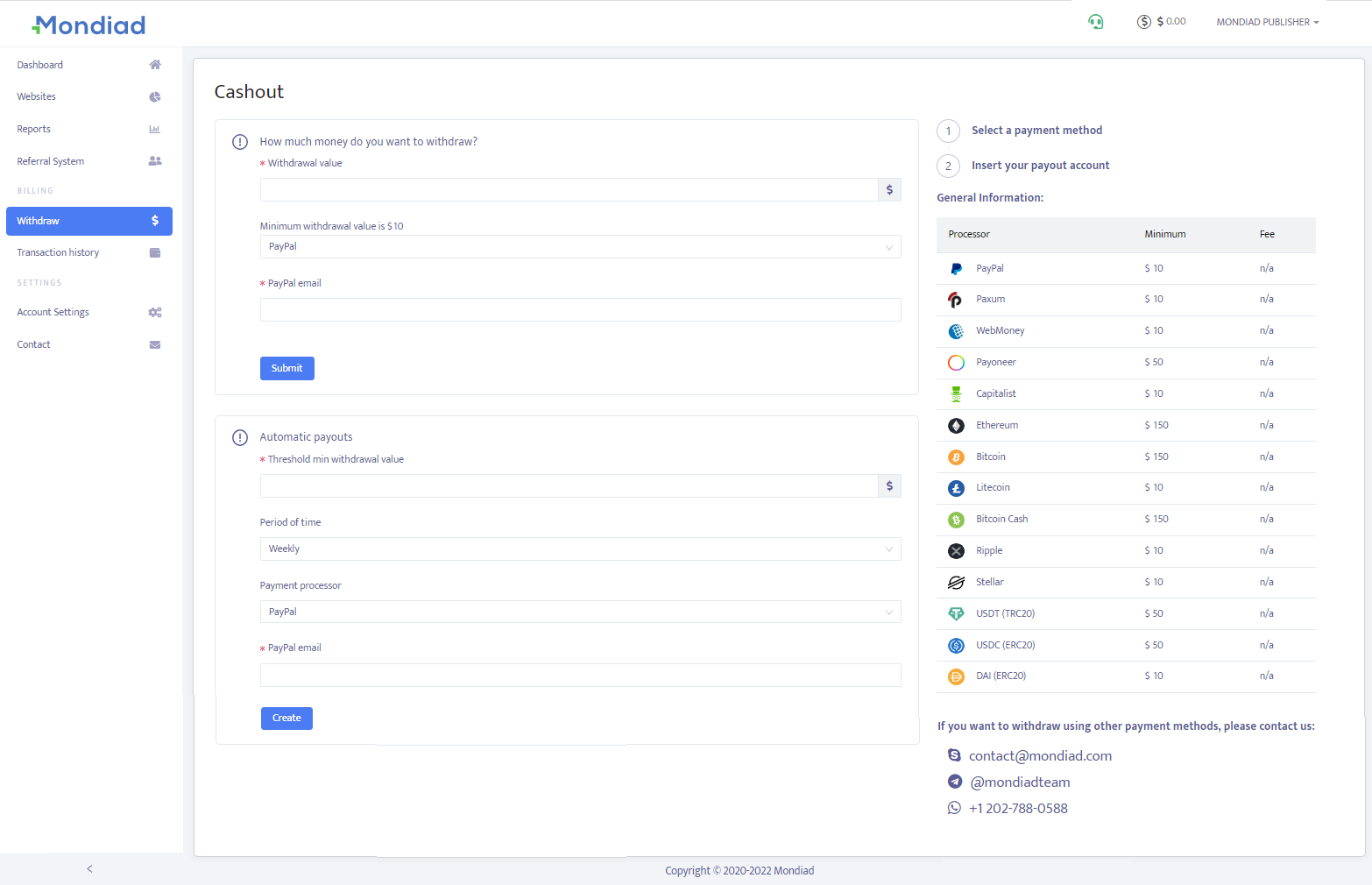
The Withdraw Page is the place you need when you want to cash out your earnings. Here you can choose what payment processor to use, the amount you wish to withdraw, check out the applicable fees and read the instructions required by each payment processor to submit your request.

The Payment Processors we are currently offering are PayPal, Paxum, Payoneer, WebMoney, Capitalist, and cryptocurrency.

→ The minimum cashout of $10 can be requested using the following processors:

  • PayPal
  • Paxum
  • WebMoney
  • Capitalist
  • LiteCoin
  • Ripple
  • Stellar
  • DAI (ERC20)

→ The minimum cashout of $50 can be requested using the following processors:

  • Payoneer
  • USDT (TRC20)
  • USDC (ERC20)

→ The minimum cashout of $150 can be requested using the following processors:

  • Ethereum
  • Bitcoin
  • Bitcoin Cash.

The n/a status means that the fee is not fixed like the other processors. It can vary depending on the exchange rate.

If you want to withdraw using other payment methods, please contact our support team.

After you`ve submitted your withdrawal request, your transaction stays pending until we validate your request or deny it and contact you through our support team to clarify the issue.


Automatic Payouts
Mondiad automatic cashouts

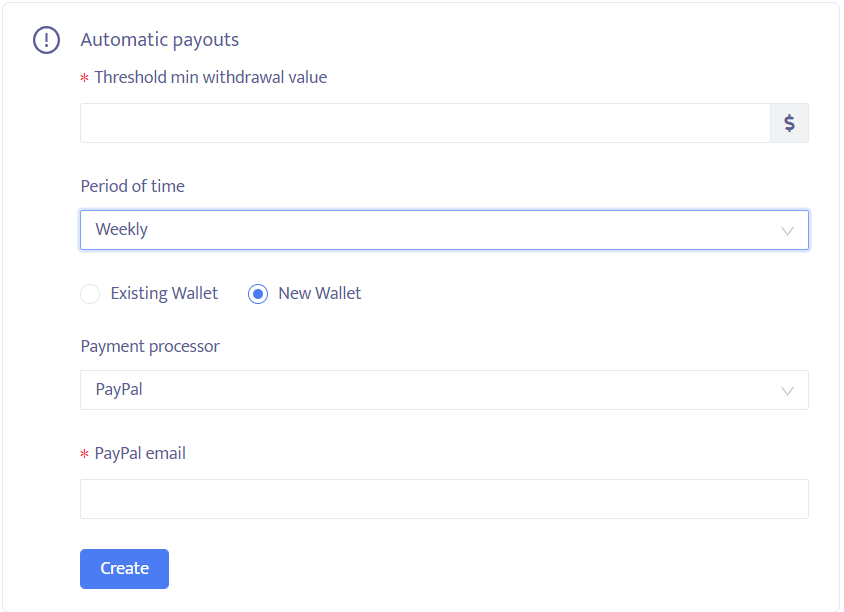
As the name implies, this feature allows you to automate the cashout of your revenue according to parameters set by you, to simplify your Mondiad experience.

To make automatic payouts, you need to set the next parameters:

  • Threshold min withdrawal value: $10
  • Cashout period (weekly / monthly)
  • Existing / New wallet*
  • Payment processor

* You can create a New Wallet right here or go to Account Setting -> Wallet, to set up your new wallet. Add the payment method/processor, the payment email/account ID, wallet ID, depending on the processor, and insert the withdrawal value.

Disclaimer: In the case where you don`t reach the minimum withdrawal threshold that you set up, your earnings remain available in your Mondiad account, until the next cashout deadline. If your automatic cashout meets all the set parameters, you will get an email notification with the transaction.


Transaction History
Mondiad transaction history

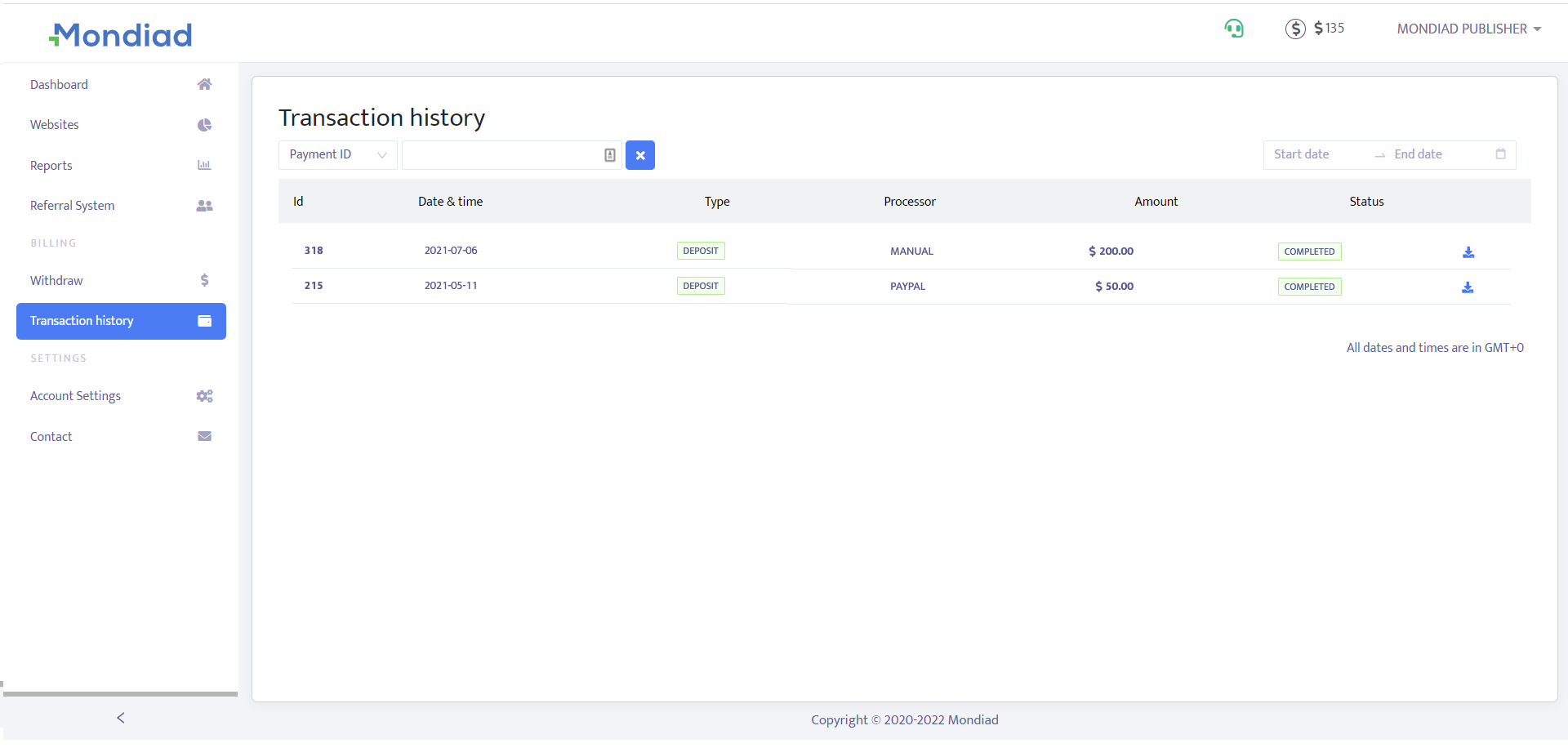
A tab below, in the Transaction History section, check out your publisher account transactions by date & time, type, payment processor, amount or status.

HelpCenter publisher
Previous ArticlePublisher Reports
Next Article Publisher Account Settings
Oana Vasarhelyi
  • LinkedIn

Oana Vasarhelyi is a performance marketing specialist at Mondiad, the global advertising network, where she has analyzed affiliate campaigns and authored advertiser-facing content since 2022.Her work draws on Mondiad's cross-vertical network data, such as spanning sweepstakes, dating, finance, iGaming, nutra, and app install offers across Tier 1–3 GEOs, to turn campaign-level performance patterns into practical guidance for affiliate marketers.A linguist by training turned ad-tech practitioner, she brings a translator's discipline to an industry that often buries fundamentals under jargon. Off the clock, she's a reader, gamer, and sketcher.

Related Posts

PARTNERSHIPS

Traffic Arbitrage: How to Set Up Mondiad Tracking with PeerClick

06.05.2026
PRODUCT UPDATES

Step Up Your Ad Game With Mondiad Popunder Advertising

16.04.2026
AFFILIATE EVENTS

How to Build a Career in the Affiliate Industry

25.03.2026
Contents hide
1 Cashout procedure & Fees
2 Automatic Payouts
3 Transaction History

Get 15% deposit bonus

Register now and you will get a 15% deposit bonus available for new users.

Register
Categories
  • AFFILIATE EVENTS
  • COMPANY NEWS
  • EXPERT KNOWLEDGE
  • INDUSTRY INSIGHTS
    • AFFILIATE MARKETING
    • CAMPAIGN OPTIMIZATION
    • MONETIZATION TIPS
  • PRODUCT UPDATES
    • PARTNERSHIPS
  • SUCCESS STORIES
PopCash.net
Facebook X (Twitter) Instagram YouTube LinkedIn
  • Home
  • About Us
  • Contact
© 2020-2026 Mondiad. All rights reserved.

Type above and press Enter to search. Press Esc to cancel.