



Hey everyone! Try Mondiad x AdsBridge! We have a surprise for you! 🎁
 We bet you have heard of 𝗔𝗱𝘀𝗕𝗿𝗶𝗱𝗴𝗲 — the most essential tool for affiliate marketers, media agencies, ad networks, and in general anyone involved with internet marketing.
𝗔𝗱𝘀𝗕𝗿𝗶𝗱𝗴𝗲 is a cloud-based solution with data centres all over the world! And this summer our friends from Adsbridge are giving a discount, especially to you. 💰
Use the promo code “MONDIAD15” on 𝗔𝗱𝘀𝗕𝗿𝗶𝗱𝗴𝗲 to get 15% off on any plan!
𝗔𝗱𝘀𝗕𝗿𝗶𝗱𝗴𝗲 top features, which will help you to increase your profits and launch your ad campaigns:
- Auto-optimization of campaigns and split testing,
- Built-in landing page editor (visual and HTML),
- Option of hiding referrer
- Multiplayer mode,
- Manual bot filter,
- Redirect domains,
***
Mondiad x AdsBridge integration guide coming up!
Step 1. Select Mondiad as your Traffic Source:
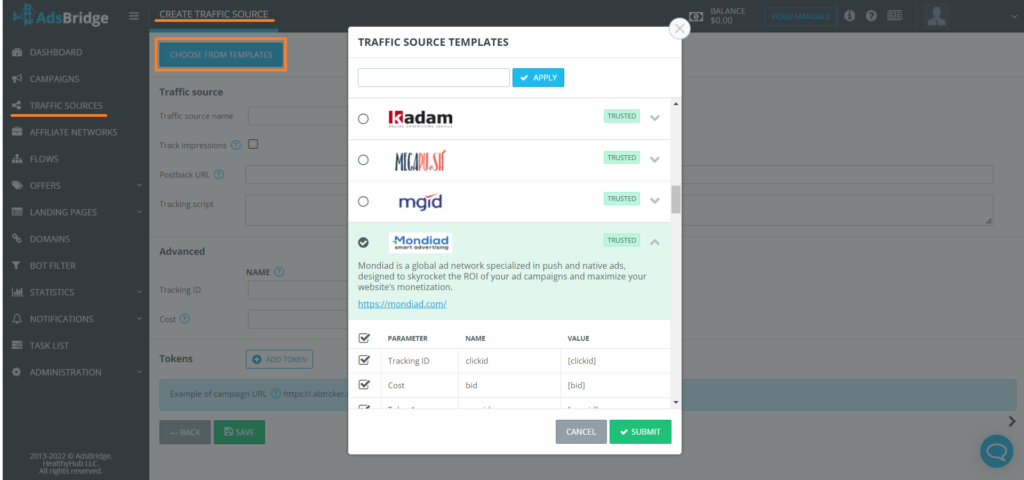
Login to your AdsBridge account, then head over to Traffic Sources -> Create Traffic Source -> Choose from Templates -> Select Mondiad.
Find below a detailed video created by AdsBridge on how to set up your traffic source, step-by-step.
Step 2. Create a Campaign in AdsBridge
Follow the steps in the video below to create your Mondiad campaign in AdsBridge.
Step 3. Starting a Campaign in Mondiad
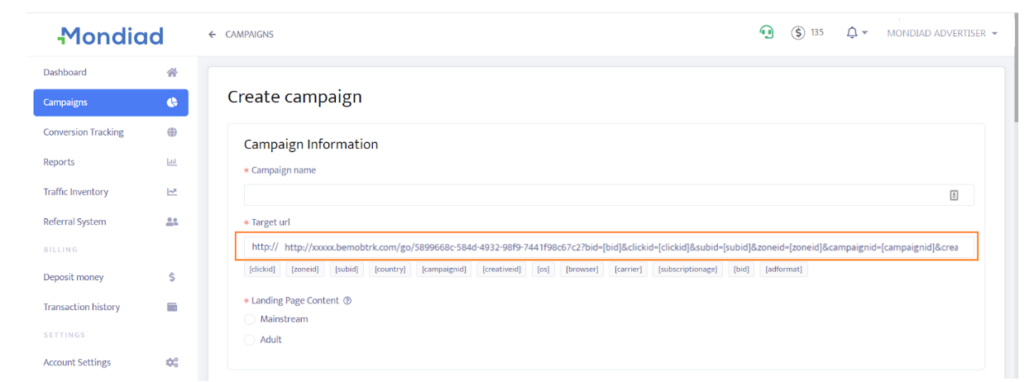
Log in to your Mondiad advertiser account and go to the Campaigns tab.
Here, follow our step-by-step guide that will show you how to set up and optimise your Mondiad ad campaign to its full potential.
If you need additional help, don`t forget the support team is happily at your disposal.